
Technical Due Diligence - Configuring a Secret GitHub Team
During due diligence one of the first things and acquirer will ask for is read-only access to your organization’s GitHub account. This request is often met with great anxiety because the seller’s executive team is usually reticent to inform company employees of a potential acquisition. Looking in from the outside it’s easy to conclude this decision has some sort of nefarious reasoning behind it, however the reality is due diligence can be both a significant distraction and time-sink for the seller, and it isn’t like the company can just halt operations during this period. Furthermore, the buyer in all likelihood will prefer the potential sale isn’t made public during due diligence because it might attract additional outside interest. While additional outside interest might be welcomed by the seller, this isn’t always the case particularly when the seller is in such a state of financial distress that acquisition is required as soon as possible to keep the company solvent.
Therefore the early days of due diligence are often conducted in a bit of a bubble, with the seller’s executive team quietly providing the buyer with access to critical systems, one of them being GitHub. Naturally any new users are likely to be noticed by the tech team, and so instead you’ll want to take advantage of GitHub’s secret team option. To create a secret team, login to GitHub, navigate to your organization’s home page, and click Teams. Then click Create Team and create a team as you usually would, however be sure to set Team Visibility to Secret:
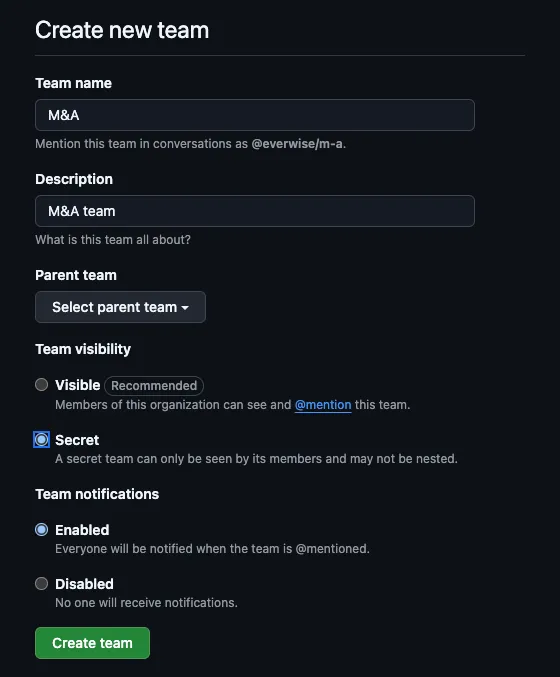
Once created, you will be added to the team. Click Add a member to add a member of the buyer’s due diligence team.
There is one critical caveat regarding GitHub secret teams, which is that other organization admins will be able to see this team. In my experience companies almost never have a single GitHub organization owner because it could present potentially significant issues should the lone owner be out of office when something occurs which requires immedate administrative action.
After adding the auditor accounts to this secret team, you’ll want to navigate to the team’s Repositories tab and add the relevant repositories. Due to GitHub limitations you can only add one repository at a time, which could present an issue should the buyer require access to potentially hundreds if not thousands of repositories. Should access to many repositories be required, I suggest using the GitHub CLI to perform a mass assignment.
By default repository access will be set to read-only. I strongly suggest leaving this default in place unless you have extraordinary (and highly unusual) reasons for granting additional rights. Should this be the case I suggest asking the company CEO to confirm this request in writing before taking any action.